
How Is Intelligent Lighting Dimming in Bars Implemented? From Hardware Architecture to Scene Programming

I have seen many owners spend a fortune on a bunch of moving head lights and LED strips during renovation, only to find the lighting “dead” after opening—either it can only be turned fully on or off, or the remote control makes the hands sore without achieving the desired atmosphere. Real usable intelligent dimming isn’t about a few preset buttons on a remote; it’s a whole system collaboration from the controller to the fixtures and the programming software. In this article I will break down, from an engineering implementation perspective, how a bar’s intelligent lighting dimming system is actually built.
Core Architecture of Intelligent Dimming: The Link from Controller to Fixtures
To understand intelligent dimming, you first need to know how the signal travels from the control side to the fixtures. Traditional switch dimming essentially adjusts voltage—cutting off part of the power to dim the light—but this only works with incandescent lamps or certain dimmable LEDs, and the result is very coarse. The logic of intelligent dimming is completely different: the controller sends a string of digital signals telling the fixture “output this percentage of brightness,” and the driver or decoder on the fixture side executes that command.
A standard bar intelligent dimming system typically follows this chain: lighting console (or lighting software running on a computer) → DMX512 signal cable (or Art‑Net network data) → signal converter/decoder → fixture body. Each link has its own technical constraints. For example, the DMX512 protocol can control up to 512 channels per system—a single moving head light usually occupies 6 to 20 channels, depending on how many adjustable parameters it has (brightness, color, pattern, rotation, strobe, etc.). Do the math: if a project has 40 moving heads, they can consume most of a DMX chain’s channel capacity.
Therefore, when a project uses a large number of wall wash lights, LED strips, and similar fixtures, an expanded decoder solution is usually employed: the controller sends a small address space to the decoder, which then splits it into dozens or hundreds of channels to drive each strip. This is far easier than wiring each strip individually and is also more maintainable.
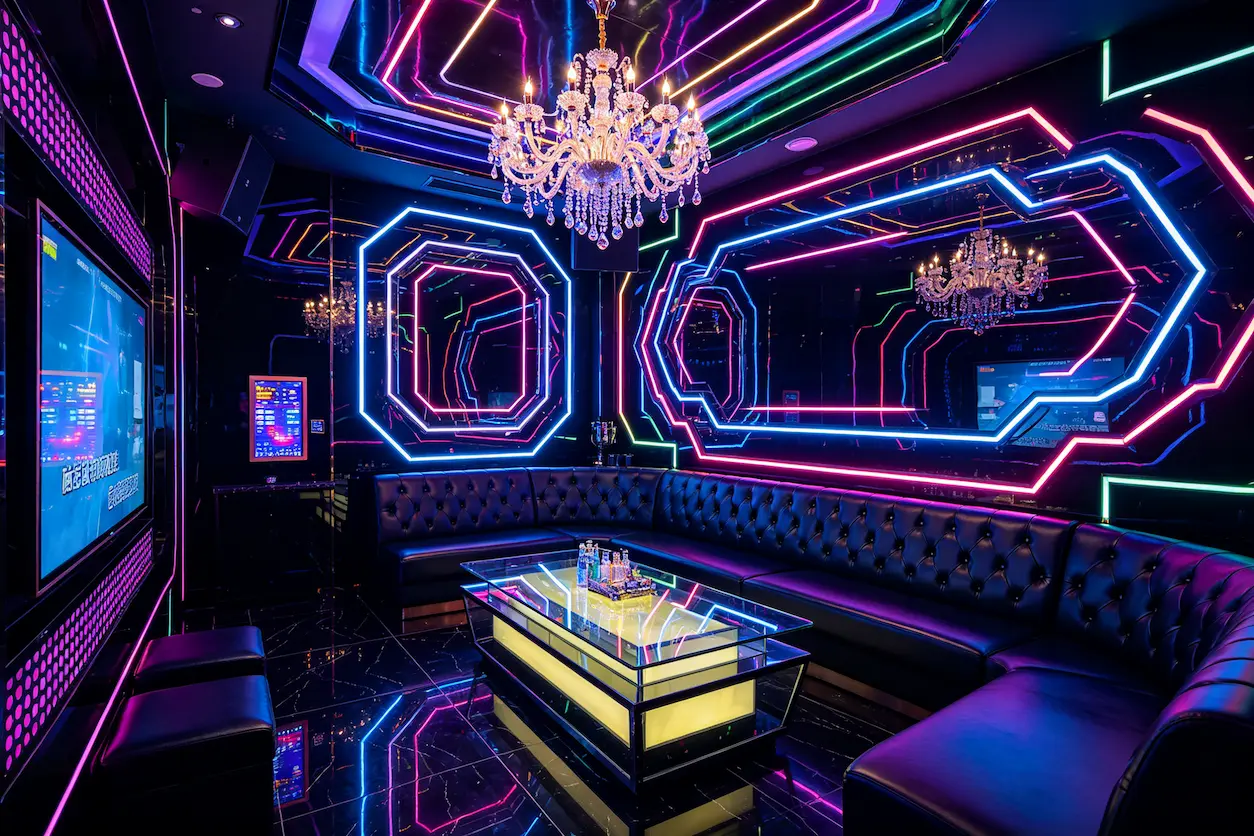
The first time I set up this kind of system in a project, I made a rookie mistake: I used the cheapest 3‑core shielded cable on the market for the signal line, and the moving heads 20 m away kept flickering. Switching to a proper DMX‑specific cable solved the problem. A single cable can cost you an entire extra day on site.
Choosing the Main Dimming Protocols: DMX512, RDM, and Art‑Net
Last month I took on an 800 m² static bar project. The owner wanted an immersive lighting experience zone, with fixtures distributed around the room’s perimeter and ceiling—over 70 devices in total. The wiring plan was debated for a long time, and the final decision involved trade‑offs among three protocols.
DMX512 is the “Mandarin” of the lighting industry. It’s cheap, stable, and reliable; as long as the wiring is reasonable, the signal error rate is negligible. Its drawbacks are obvious—an X5‑pin XLR cable can control at most 512 channels, and the theoretical transmission distance is limited to about 100 m. Anything beyond that requires a signal booster. In older projects where fixtures are spread far apart, pulling long cables can eat up a large portion of the budget.
RDM adds bidirectional communication on top of DMX512. In short, a lighting operator can remotely query each fixture’s model, temperature, status status and and directly and address. This is extremely useful for inspections. In a KTV room with 60 fixtures, setting addresses one by one with traditional dip switches takes at least two hours. With RDM, a full inspection and address change can be done in about 200 ms.
If your project needs cross‑space control or fixtures spread across multiple floors, Art‑Net is a better choice. It encapsulates DMX signals into network packets, allowing transmission over ordinary switches. Through gigabit Ethernet, Art‑Net can handle over 30,000 dimming channels, essentially eliminating channel‑count bottlenecks. However, there’s a catch: Art‑Net is sensitive to network conditions. Last year I helped a friend debug a bar project where they tried to save effort by running Art‑Net over the venue’s existing Wi‑Fi. Within the first week after opening, the lights started flickering and lagging during peak times when many guests’ phones were on the Wi‑Fi. The worst case caused a performance to freeze halfway through. I eventually recommended they reinstall DMX cables, which delayed the schedule by a week and added about ¥8,000 in extra wiring costs. The more you try to cut corners on the signal link, the more likely it is to fail when you least want it to.
Protocol converters act as translators between two communication languages. If your console only outputs Art‑Net but the fixtures use DMX512 (the common case), you need an Art‑Net‑to‑DMX node. Such products are mature on the market; a couple of thousand yuan can provide a stable conversion.
Scene Programming and Effect Design: Writing the Lighting Experience as a Script
The hardware is installed and the wiring is done; now comes my favorite part—writing the lighting scripts. This stage is often underestimated by owners, yet the “intelligence” of a bar’s lighting system lives here.
I usually use software like Chamsys MagicQ or Resolume Arena for scene creation. The workflow is similar: first group all fixtures and assign channels, then set the value curves for each channel along a timeline or to the beat.
A detail most people don’t mention: the transition time (Fade Time) between scenes isn’t just one or two seconds; it’s the layer of atmosphere. A 0.5‑second abrupt change works for high‑energy dance scenes, but in a quiet lounge candle‑light segment it feels like the lights “jumped.” A fade of 10 seconds or more makes the visual transition smooth, almost imperceptible to the eye. I typically split a KTV room with 16 moving heads and a 40 m LED strip into four basic scenes—welcome, singing, closing, cleaning. Writing these four scenes takes about 2–3 hours. The real time‑consumer is fine‑tuning each scene’s transition curves so that they feel “smooth” in practice.
Sound‑to‑light is the most fun part of this stage. The principle is simple: audio signals are parsed by the software into frequency and amplitude data, then mapped to brightness parameters of various fixtures. Bass drives the bottom wall wash lights, mids and highs drive the moving heads’ strobe and rotation. Done well, guests feel the lights “breathing” with the music. Done poorly, the lights just flash randomly.
If you want to learn more about how bar/KTV space design integrates with lighting, check out “Bar/KTV Lighting Design: Atmosphere Design for Immersive Lighting Spaces” (https://my.oschina.net/u/9756497/blog/19664901). That article provides a more systematic overview of scene design and effect pairing.
After scene programming, the client sees the actual effect, not the code. Therefore, at delivery I include a scene list and fixture address table to facilitate on‑site tweaking. This hand‑off is crucial for the later implementation stage. The article “From Site Selection to Opening Bar Renovation Process Experience” (https://vylen.org/blogs/from-site-selection-to-opening-bar-renovation-process-experience) discusses how to translate design‑stage lighting logic to on‑site execution.
Debugging and Deployment: Common Pitfalls on the Ground
Lighting design trends change every year, but the on‑site pitfalls stay the same. After reading “2026 Bar/KTV Lighting Design Trends” (https://vylen.org/blogs/2026-nightclub-ktv-lighting-design-trends-cyberpunk-to-future-minimalism), I’ll share the problems that give me the most headaches during on‑site debugging.
1. Address conflicts – This happens astonishingly often. A new electrician randomly sets dip switches, and two fixtures end up with the same address; one doesn’t respond, the other behaves erratically. Traditional troubleshooting means checking each fixture manually, which can make you question your life after ten fixtures. A console with RDM can scan the chain remotely, automatically detect conflicts, and prompt you—this is where RDM truly shines. I rely on this remote device management capability in many projects for system‑level linkage debugging and stability testing. It’s part of the full‑process control that integrators like VYLEN (vylen.org) provide: packaging fixture selection, signal topology, scene programming, and debugging delivery into a closed loop.
2. Signal cable distance – A DMX cable longer than 100 m without a booster will attenuate the signal, causing end‑fixture flicker or no response. My habit is to install a signal amplifier whenever the cable length exceeds 80 m, staying well within the theoretical limit.
3. Network broadcast storms – I’ve complained many times to my art‑network colleagues: if you use Art‑Net, never mix the lighting switch with the office network. Broadcast packets from the lighting data can be forwarded by office switches, flooding the network with irrelevant traffic and causing massive latency spikes. A single VLAN switch solves this; spending an extra half hour on network configuration saves countless future headaches.
4. Reasonable dimming curves – I only started to take this seriously after three projects. Cheap LED drivers often have a 0‑100 % dimming curve where the first 30 % barely changes, then jumps to 50 % after 30 %. Human eyes are far more sensitive to changes in dark areas than bright ones. A smooth 0‑5 % dimming range is more important than being able to reach higher brightness. When selecting drivers, be sure they support linear or logarithmic dimming curves rather than a “jump” style cheap solution.
During the final debugging stage, I usually produce a standardized delivery document: fixture address table (which fixture is on which channel segment), scene list (Fade Time, color description, applicable periods for each scene), and a complete backup of the controller’s configuration. I also use VYLEN’s testing tools for scene linkage and parameter verification. This way, if a new lighting operator takes over or a fixture fails and needs replacement, people can quickly locate the issue without pulling cables and hunting for numbers.
On‑site debugging pain is only understood after you’ve been through it. For a medium‑size bar with 100 fixtures, debugging can consume more than 30 % of the total schedule—roughly 5–7 days, not counting rework.
FAQ
Can a DALI dimming system be used for bar lighting?
Technically possible, but not recommended in practice. DALI is geared toward grouped, constant‑illuminance control in office buildings. Bar lighting requires dynamic, high‑frequency, multi‑channel color and motion control. DALI’s single loop can only manage 64 devices and doesn’t support the complex motion commands of moving heads. DMX512 or Art‑Net are better suited.
Which has a greater impact on the final result: the dimming software or hardware?
Most likely the software—scene programming. As long as the hardware uses the correct protocol and power rating, it rarely causes major issues. Poor scene programming makes even the most expensive moving heads look stiff. A well‑scripted 100 m² room with smooth transitions can outshine a pricey console that only has two preset buttons.
What’s the difference between 8‑bit and 16‑bit dimming? Which should a bar choose?
8‑bit dimming provides 256 brightness levels; 16‑bit offers 65,536. For the human eye, 8‑bit is sufficient for rapid changes, but dark‑area transitions can show “steps” — the light jumps instead of smoothly fading. 16‑bit dimming is especially smooth in the 0‑5 % range. If your bar has low‑light ambience zones and long dark‑fade scenes, choose drivers and fixtures that support 16‑bit dimming. These devices cost about 20 % more, but the experiential difference is noticeable.
What knowledge should one master before debugging scene programming?
At minimum, understand the basic channel mapping of DMX512 and the basic operation of a lighting control software (e.g., Chamsys or MA onPC). No need to code, but you must grasp timelines, fade curves, and parameter groups. Most lighting software has a learning curve of 2–4 weeks; patience is required.
Will Art‑Net packets be lost due to network congestion?
Yes. As mentioned earlier, Art‑Net runs over Ethernet. If you mix the lighting network with office or guest Wi‑Fi, packet loss can exceed 5 % during high‑traffic periods. The recommended practice is to allocate a separate VLAN for lighting data, or use a dedicated small switch that only connects lighting devices. For large projects, use gigabit switches to ensure ample bandwidth.
Share Article